Visitor Management System
Visitor Management System
Visitor Management System
Overview
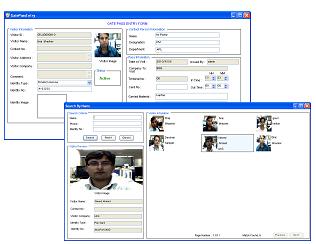
VMS tracks the visitors in private or public premises. VMS is based on biometric face recognition technology. With VMS, you can keep a check on all in coming visitors, track their movement, as well as register their out going details by barcode technology (Reading the barcode on visitor pass)
Advantages
- No human and device interaction required.
- Fast processing compared to conventional biometric solutions.
- Accuracy in recognition.
- Existing hardware infrastructure can be used.
- Easy installation.
- Less hardware required, since technology is software based.

Features Overview
New Visitor
- Registers the visitor with a unique ID
- Stores the Face data and personal information
Known Visitor
- Recognizes the face and picks his/her registered data from the Database
- Generates visitor pass (Can be Customized) and records his incoming time
- Updates the Database information when required
New Visitor
- Registers the visitor with a unique ID
- Stores the Face data and personal information
Known Visitor
- Recognizes the face and picks his/her registered data from the Database
- Generates visitor pass (Can be Customized) and records his incoming time
- Updates the Database information when required
Application
Identify repeat visitors and drastically reduce the time (under 1 minute) to create Visitor pass
Search the registered data by Face Image, Name, Phone number and ID
Identify blacklisted visitors (e.g., Criminals, etc.) and restrict them from entering your premise.
Identify VIP visitors and offer them special treatment
Control the visitor movement by restricting their Entry, Exit points and Entry, Exit timings
Use external image for registration, to record the data from other system.
Integrate with existing Access control or Visitor Management application.
System Requirements
Hardware
- Intel Pentium I3 (3.00 GHz)
- 2 GB RAM
- 2 GB Virtual Memory
-
Hard drive: 2.0 GB Free
System
- Microsoft Windows XP 2002 Service Pack 3
- Microsoft dot Net framework 3.5
-
Microsoft Visual C++ 2005 Redistributables
Others
- Barcode scanner: Symbol LS2208AP
-
Camera: Microsoft LifeCam Cinema 720HD
Contact Us
Unikaihatsu Software has Head Office in Mumbai and main Branch Office in Tokyo, Japan. We have other development centres across India and sales offices across Japan. All Locations